Your Claude Code status line is a script. Don't freeze it.
Configure a Claude Code status line: JSON on stdin, settings.json, and the fields that matter. A builder copies a prompt, not a frozen script.
 Manuel Hedinger
I compact too late. I notice the five-hour limit when the next reply is a paywall. I forget which model I switched to three messages ago. All of that is already in the session. Claude Code just doesn't put it where I look.
That's what the status line is for.
The short answer
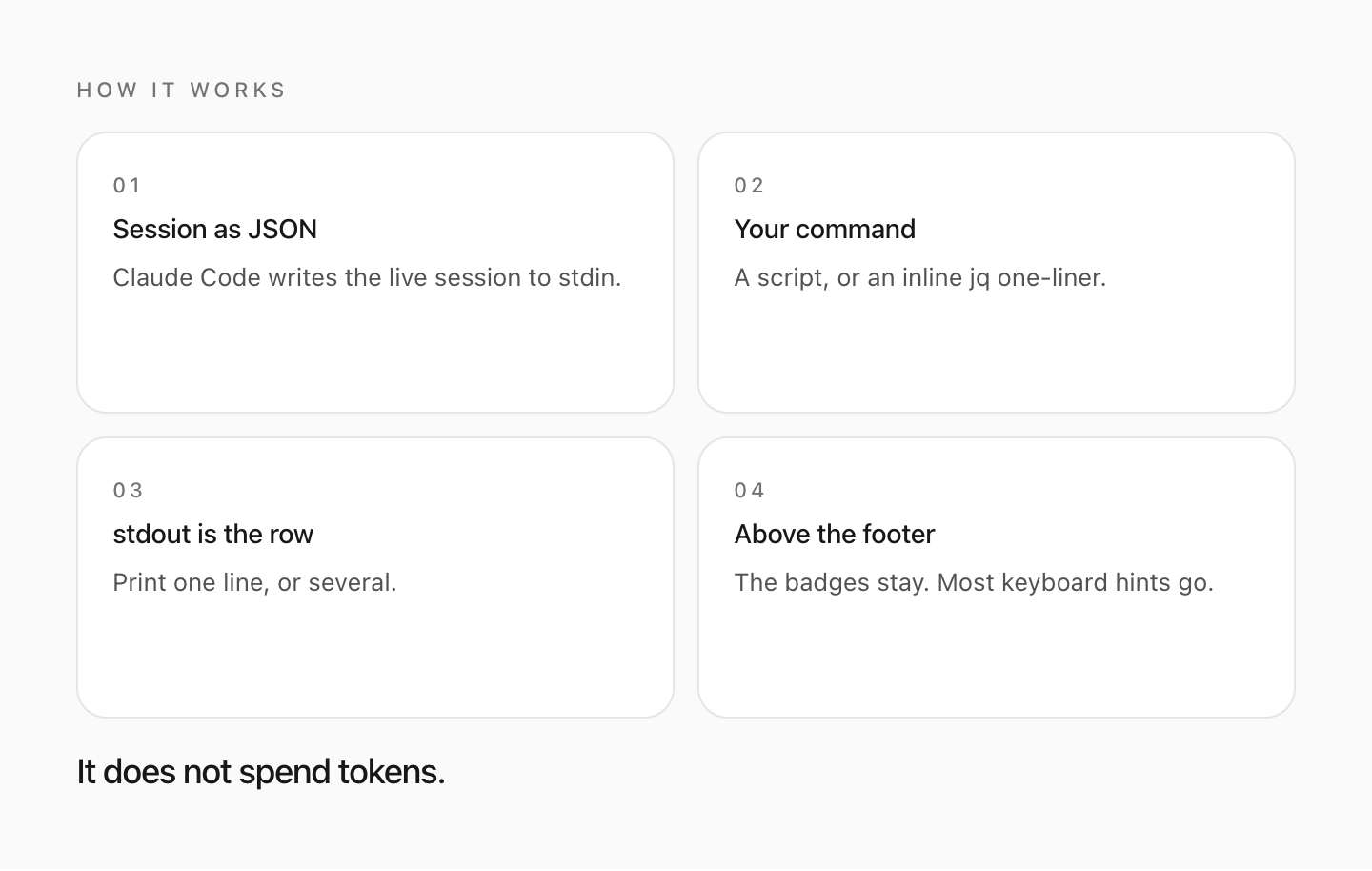
The status line is a row above the built-in footer badges. Claude Code runs a
command, feeds it the current session as JSON on stdin, and renders whatever
the command prints to stdout. It does not spend API tokens. It does not
replace the badges. It does hide most of the keyboard hints — esc to interrupt, ? for shortcuts, the hold-space-to-speak prompt — so if you live
on those, that is the trade.
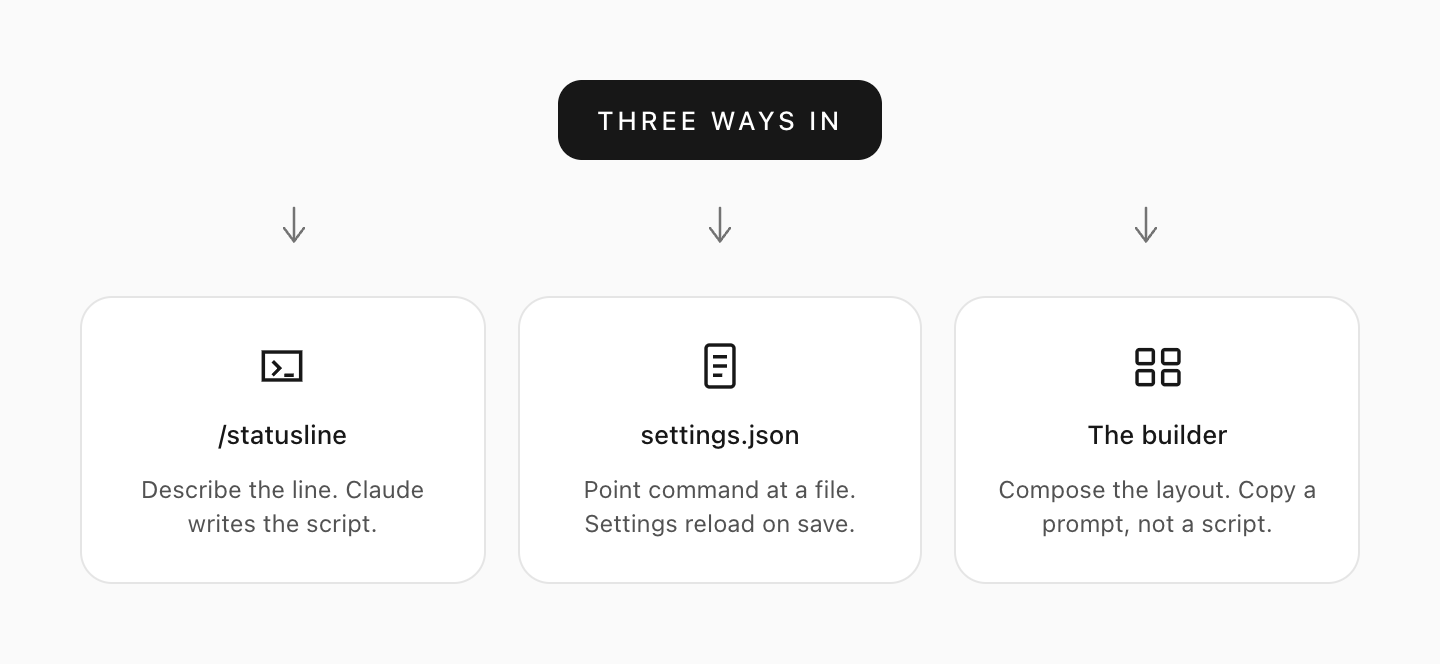
You get there three ways. Describe the line with /statusline and let Claude
write the script into ~/.claude/. Put a statusLine object in
~/.claude/settings.json yourself. Or compose the layout in the
status line builder and paste the prompt. The
builder never emits a script. A script published in a blog post is stale the
next time Anthropic adds a field. A prompt is read against the docs Claude
Code already has.
The official walkthrough is Customize your status line. What follows is the version I wish I'd had: what to show, what to leave alone, and the bits that fail silently.
Ask /statusline
Type something like:
/statusline show model name and context percentage with a progress barClaude generates a script under ~/.claude/ and writes the settings for you.
Approve the file-edit prompts if it asks. This is the right first move if you
have never had a status line and don't care how it works yet.
To take it out later, /statusline delete (or clear, or remove it)
works. Or delete the statusLine field from settings.json yourself.
Write the settings
User settings live in ~/.claude/settings.json. Project settings work too.
The shape is small:
{
  "statusLine": {
    "type": "command",
    "command": "~/.claude/statusline.sh",
    "padding": 2
  }
}
type is "command". command is a script path or an inline shell snippet.
Settings reload on save; you don't restart Claude Code.
padding is extra horizontal space in characters, on top of the built-in
gutter. Default 0.
refreshInterval re-runs the command every N seconds on top of the
event-driven updates. Minimum 1. Set it for a clock, or when background
subagents change git state while the main session sits idle. Leave it unset if
you only care about replies.
hideVimModeIndicator hides the built-in -- INSERT -- under the prompt. Set
it when your script already prints vim.mode, so you don't see the mode
twice.
The command runs in a shell, so a one-liner is enough for a first check:
{
  "statusLine": {
    "type": "command",
    "command": "jq -r '\"[\\(.model.display_name)] \\(.context_window.used_percentage // 0)% context\"'"
  }
}
You will need jq. On Windows, write the path with
forward slashes (C:/Users/you/.claude/statusline.sh). Git Bash treats
backslashes as escapes and the command fails with nothing on screen.
Compose it, then let Claude write it
I don't keep a gist of statusline.sh. The stdin JSON grows. Last year's
script doesn't know about rate_limits, or pr.kind for GitLab, or
COLUMNS. The follow-up I actually want is "now make the bar wider" or "add
the open PR".
That's why the status line builder copies a prompt, not a file. You drag the segments you want — directory, branch, model, context, the 5-hour and 7-day limits, cost, a clock, lines changed, the PR, the worktree — pick a palette, and paste the English prompt into a session. Claude writes the script, points settings.json at it, and is still there for the next tweak.
It runs in the browser. Nothing you arrange is uploaded.
How the data moves
Claude Code serializes the live session and pipes it in. Your command prints a line. That line is the row.
The command runs once when a session starts, including a resume. After that it runs again when:
- a new assistant message arrives
/compactfinishes- the permission mode changes
- vim mode toggles
- you change
commandin settings - a
refreshIntervaltimer fires, if you set one
Updates are debounced at 300ms. A change to command itself skips the
debounce and runs immediately. If a new update arrives while the script is
still running, the in-flight run is cancelled. Edit the script on disk and the
next trigger picks it up; there is no extra reload.
Event-driven updates go quiet when the main session is idle, for example while
a coordinator waits on background subagents. That's the case for
refreshInterval.
You can print several lines. You can use ANSI colours. You can wrap text in
OSC 8 sequences to make it clickable (Cmd-click on macOS, Ctrl-click
elsewhere) in iTerm2, Kitty or WezTerm. Terminal.app does not do clickable
links. If the sequences show up as literal \e]8;;, use printf '%b', not
echo -e.
Do not call tput cols inside the script. Claude Code captures stdout instead
of attaching you to the terminal, so width detection from inside the process
is blind. Read COLUMNS and LINES. They are set before the command runs,
from version 2.1.153.
The row hides during autocomplete, the help menu and permission prompts. Outside fullscreen, notifications share the same row and will truncate you on a narrow terminal.
What is worth showing
The JSON is large. Most of it is noise on an 80-column row.
Context. context_window.used_percentage is the field to use. It is
calculated from input tokens only (input_tokens + cache_creation_input_tokens + cache_read_input_tokens). Output tokens are not
in it. If you compute the percentage yourself from current_usage, use the
same formula or you will disagree with /context. current_usage is null
before the first API call, and again after /compact until the next reply
fills it. Same for the percentage fields early in a session. Fallback with
// 0 in jq.
Default window is 200k tokens, or 1M on extended-context models.
exceeds_200k_tokens is a fixed threshold, not "the window is full".
Cost. cost.total_cost_usd is a client-side estimate. It is not your
bill. It resets to $0 on /clear (before v2.1.211 it carried over, which was
confusing). total_duration_ms is wall-clock since the session started;
total_api_duration_ms is time spent waiting on the API.
Rate limits. rate_limits.five_hour and rate_limits.seven_day exist for
Claude.ai Pro/Max after the first API response. Each window may be missing on
its own. Treat absence as "don't draw the segment", not as 0%.
Git. There is no git.branch in the JSON. You run git yourself. That is
slow in a large repo, and the script runs often, so cache it. Use session_id
in the cache filename, not $$ or os.getpid(): those change on every
invocation and the cache never hits. Concurrent sessions in different repos
must not share a file.
workspace.git_worktree is set when you're in a linked worktree.
worktree.* is a different object, present only during a Claude Code
worktree session.
The rest I actually use. model.display_name plus effort.level.
workspace.current_dir (same value as cwd; prefer the nested field).
pr.number and pr.review_state when a PR or GitLab merge request is open
on the branch. session_name if you named the session; the default
my-app-3f style name does not populate it. vim.mode if you use vim mode.
A field that is absent is not the same as a field that is null. Handle both.
A first script
Bash, on macOS and Linux. Make it executable (chmod +x ~/.claude/statusline.sh)
and point command at it.
#!/bin/bash
input=$(cat)

MODEL=$(echo "$input" | jq -r '.model.display_name')
DIR=$(echo "$input" | jq -r '.workspace.current_dir')
PCT=$(echo "$input" | jq -r '.context_window.used_percentage // 0' | cut -d. -f1)

echo "[$MODEL] ${DIR##*/} | ${PCT}% context"
Test it without opening Claude Code:
echo '{"model":{"display_name":"Opus"},"workspace":{"current_dir":"/home/user/project"},"context_window":{"used_percentage":25},"session_id":"test"}' | ./statusline.shKeep the printed line short. The bar is not wide, and on a narrow terminal the notifications on the right will eat it.
When it stays blank
The usual list, in the order I check:
- Is the script executable, and does it print to stdout rather than stderr?
- Did you accept the workspace-trust dialog? Until you do, the row stays
empty and
claude --debuglogs that the command was skipped. - On Windows, did a backslash in the path get eaten by Git Bash?
- Are you looking at nulls before the first reply? Fallbacks, then wait one turn.
- Did someone set
disableAllHooks? Outside managed settings that disables a user status line.allowManagedHooksOnlyin org-managed settings silently ignores yours.
claude --debug logs the exit code and stderr of the first invocation in a
session. Asking Claude to run the statusLine command against your settings
file also surfaces the error faster than staring at a blank row.
If you see -- or empty values after several messages, restart once. If OSC 8
links render as text, check the terminal, then try FORCE_HYPERLINK=1 claude.
What I actually run
Three rows. Directory and branch on the left, a clock on the right. Model on the left of row two, context on the right. The 5-hour limit on row three, the 7-day limit opposite. That is the "Mine" preset in the builder. I care about compacting before the window is full, and about the weekly cap before Friday afternoon.
I still don't check in the script. When I want a different segment I paste a new prompt. The builder is where I decide the layout. Claude Code writes the file.
If you want the footer to grow clickable badges when an ID shows up in the
conversation, that is a different setting: footerLinksRegexes. No script
involved.
If a status line is fighting you and you would rather not spend the evening on ANSI codes, write to me. Sometimes the answer is a 40-character jq line.