A skill is a folder. skills.sh just puts it there.
Find and install Agent Skills with skills.sh: SKILL.md, the CLI, project vs global — and how skills differ from MCP and AGENTS.md.
 Manuel Hedinger
I paste the same checklist into every chat window. How a pull request should
look here. When the agent must stop instead of saying "done". How a blog post
is built on this site. AGENTS.md is already long — and it grows with every
exception.
That's what skills are for. And skills.sh is the part that finds them and puts them in place.
The short answer
A skill is a folder with a file named SKILL.md. It says what the agent
should do and when. Scripts, reference docs and templates can sit next to it.
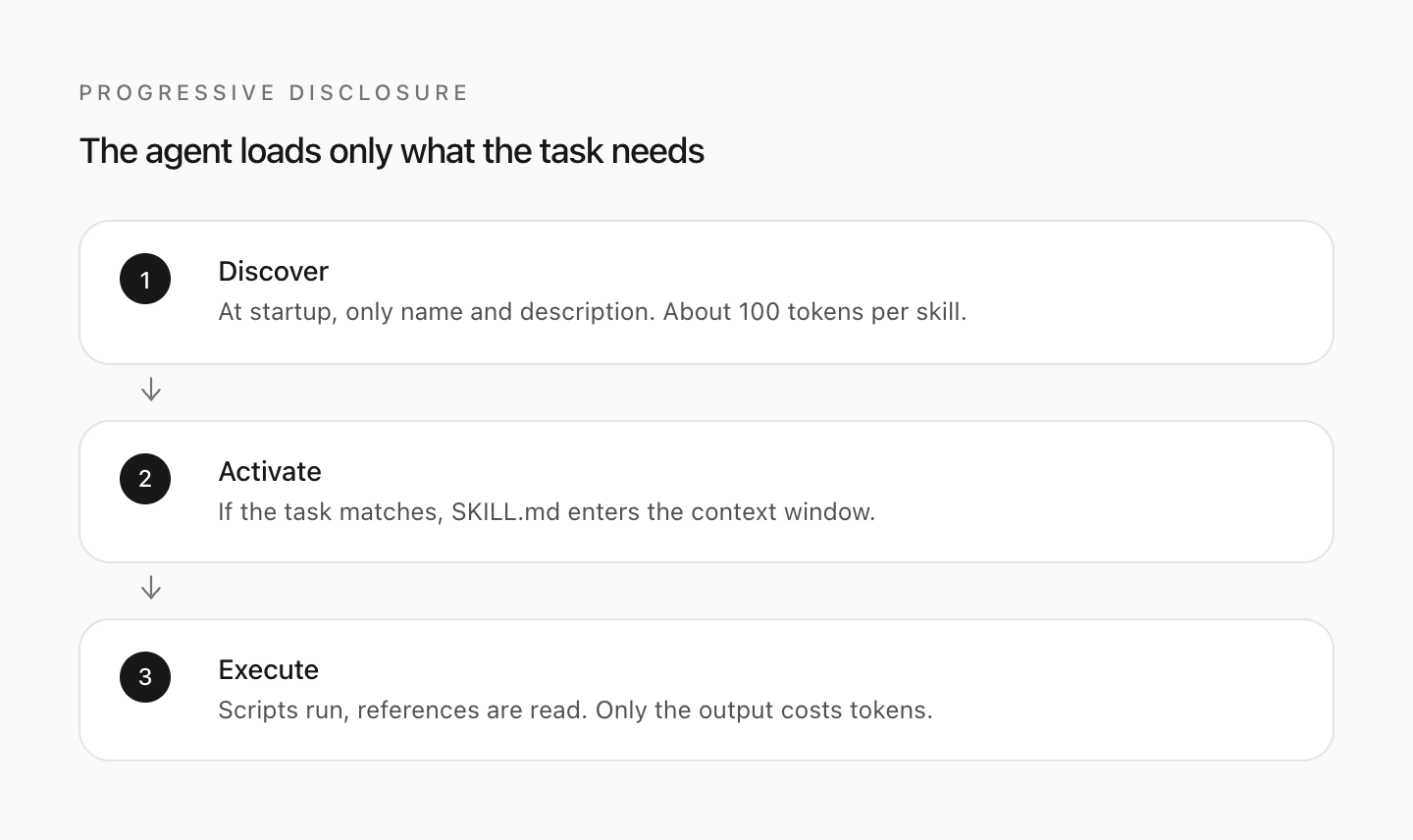
The agent first sees only the name and description. It loads the rest when
the task matches.
skills.sh is the public directory and the CLI that goes with it, run by Vercel. The format comes from Anthropic and lives in the open at agentskills.io. The website is not the spec. The CLI is not the agent.
Install:
npx skills add vercel-labs/agent-skillsThe CLI detects which agents you have locally and drops the folders where
those agents look: .claude/skills/ for Claude Code, .agents/skills/ for
Cursor, and so on. Default is the current project. With -g the skill lands
in your home directory and applies everywhere.
Official docs: skills.sh/docs. The CLI is on
GitHub. What follows is the version
I wish I'd had: how a skill differs from MCP and from AGENTS.md, how to
find one without trusting the leaderboard — and the places it fails silently.
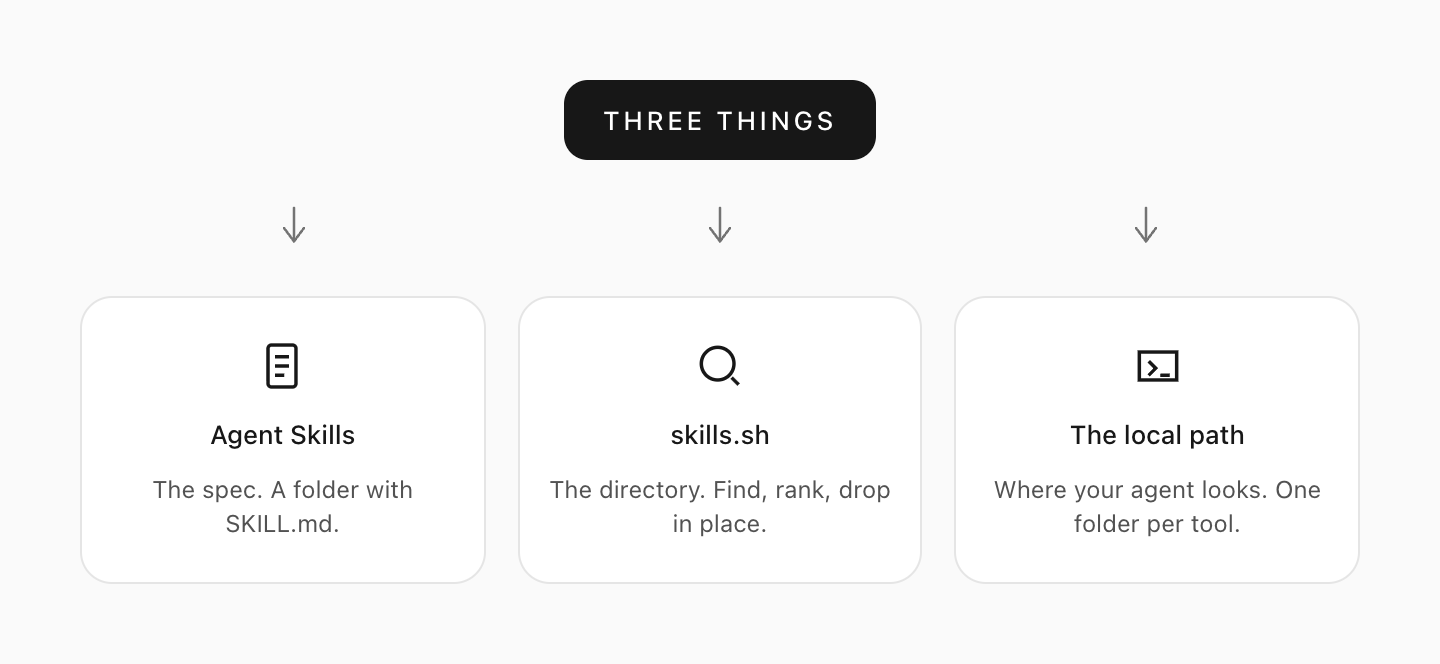
Three names, one mix-up
Agent Skills is the folder. YAML frontmatter with name and
description, Markdown underneath. That's the spec. An agent that speaks it
can read the same folder — Claude Code, Cursor, Codex, GitHub Copilot, Gemini
CLI and dozens more. The current list is in the
CLI README.
skills.sh is npm for those folders. The site shows what people install.
The CLI (npx skills) copies or links them into the path your agent knows.
You can drop the same folder in by hand without the CLI. You can use the CLI
without the site. Neither is the format.
The local path is where your agent looks. A skill in ~/.claude/skills/
is invisible to Cursor. One that only lives in .agents/skills/ is invisible
to Claude Code. The CLI does the wiring — if you tell it which agent.
Search "skills" and you land on Anthropic, or Vercel, or a leaderboard of install counts. Three layers. Only the first is the capability. The other two move it around.
Skill, MCP or AGENTS.md
Three mechanisms people dump in the same bucket:
AGENTS.md and CLAUDE.md are always on. Facts about the repo, conventions,
things that must be true in every session. When the file turns into a
procedure — a checklist, a multi-step flow, "read X first, then Y" — that
belongs in a skill. The description costs a few tokens. The rest loads only
when the task matches.
A skill is procedural knowledge. When to act, in what order, how you know you're done, which traps exist. It can ship scripts the agent runs instead of rewriting them every time.
MCP attaches tools: APIs, databases, the browser. The agent can then call something. A skill tells it when and how. They complement each other. A browser MCP without a skill clicks somewhere. A skill without a tool describes steps the agent cannot take.
Rule of thumb: if it belongs in every session, it goes in AGENTS.md. If you
keep repeating the same procedure, it becomes a skill. If the agent needs an
external interface, that's MCP.
Install a skill
You need Node so npx exists, and at least one agent the CLI knows. Then the
short form owner/repo is enough:
npx skills add vercel-labs/agent-skillsThat's the example from the official docs. It clones the repo, looks for
SKILL.md files, and asks which skills and which agents. For CI, or when you
don't want the prompts:
npx skills add vercel-labs/agent-skills --skill frontend-design -a claude-code -y--skill takes a name, or '*' for all of them. -a targets an agent
(claude-code, cursor, codex, …). -g writes to ~/ instead of the
project. --copy copies instead of linking; symlinks are the recommendation
because an update then has one source.
It doesn't have to be GitHub shorthand. Full GitHub URL, GitLab, any git URL,
a local path, even a direct SKILL.md or an archive. Private repos use the
auth Git already has — no extra token unless you set GITHUB_TOKEN on
purpose.
After it runs:
npx skills listIn Claude Code the folder should sit under .claude/skills/<name>/, in
Cursor under .agents/skills/. Type / and search the name, or ask a
question that matches the description. If nothing happens: check the YAML,
check the path, restart the agent. The CLI logs the target path; don't guess.
Use a skill without installing it:
npx skills use vercel-labs/agent-skills@web-design-guidelines | claudeThat writes the files to a temp directory and prints a prompt. With
--agent the CLI starts the agent for you. Fine for a test. For something
you want to keep, use add.
Teams can bundle a pack on skills.sh: several skills, including private
ones, one install URL of the form npx skills add https://skills.sh/p/<id>.
Packs are unlisted, not access-controlled. Anyone with the URL can install.
Don't put secrets in them.
Search without trusting the leaderboard
The site has All Time, Trending (24h) and Hot. The numbers come from
anonymous CLI telemetry — on by default, deduplicated hourly: which skill, on
which agent. No content, no people. Turn it off with DISABLE_TELEMETRY=1 or
DO_NOT_TRACK=1.
The leaderboard counts installs, not quality. A meta-skill that helps you
search collects installs because the CLI offers it — not because it solves
your actual problem. Azure packs, design kits, video pipelines: a high number
means "a lot of people ran npx skills add", often for a whole repo at once.
Better:
npx skills findNo argument is an interactive search. With an argument it's a keyword
(npx skills find typescript). --owner vercel limits it to that org's
repos. Then read the SKILL.md before you install. skills.sh shows the
source, partner security audits, and which agents it lands on. Skills that
fail every partner audit leave the directory. That is not a blank cheque.
Anthropic says the same in its own docs: a skill can bring instructions and
code. Treat it like software you install.
Being on the leaderboard means people ran npx skills add owner/repo. There
is no review that admits you. There is also none that takes a bad skill down,
as long as the audits don't fail.
Write your own
The third time you dump the same instructions into a chat window is the moment.
npx skills init my-skillcreates a SKILL.md. The two required fields:
---
name: my-skill
description: What this skill does and when to use it
---
name is lowercase, hyphens, 64 characters max, matching the folder name.
description says both: what it does and when the agent should load it.
"Helps with PDFs" is too thin. "Extracts text and tables from PDF files,
fills forms, merges files. Use when handling PDFs." works, because the agent
holds the description against your message.
The rest is Markdown. Steps, examples, edges. The spec recommends keeping
SKILL.md under 500 lines and moving detail into references/. Scripts go
in scripts/. Templates in assets/. The agent loads those extras only when
the instructions point at them.
A good skill is boring to read. It says what to do, how you know it landed, and when to stop. It does not explain why skills are the future. The agent won't notice, and you don't want to spend the tokens on it.
To distribute, a public GitHub repo is enough, as long as the CLI can find a
SKILL.md — at the root, under skills/, or in the paths the agent itself
uses (.claude/skills/, .agents/skills/, …). Once someone runs
npx skills add against it, it shows up in the telemetry.
When it doesn't fire
The usual list, in the order I check:
- Is the folder where this agent looks? Claude Code does not peek into
~/.cursor/skills/. - Are
nameanddescriptionvalid YAML? Without both fields the CLI doesn't find the skill. - Does the description match the task? If it only says "utility for developers", the agent never loads it. The description is the index.
- Did you install globally and expect it in the project — or the other way around?
- Did someone set
disable-model-invocation? Then you have to invoke it yourself with/name. That's a Claude Code field, not part of the open spec.
npx skills list shows what the CLI thinks is installed. The agent has its
own view. Check both against the path, not against each other.
And: a skill that starts a script runs with the same permissions as the
agent. Read SKILL.md and everything under scripts/ before you hit -y.
What I actually run
This site has skills for a post's cover, for infographics, and for prose that sounds like a chatbot. They are folders. I didn't pull them off the leaderboard. I wrote them because I was explaining the same flow every time.
I don't install forty "just in case". Every description sits in context from the start. Twenty vague skills cost more and misfire more than three precise ones. The ones I keep have a hard edge: that one procedure I would otherwise type again.
If a skill isn't firing for you and you'd rather not spend the evening in YAML, write to me. Sometimes the missing line is "Use when…" in the description.